Building a Self-Updating Daily-Agenda Wallpaper
My laptop wallpaper is now a poster of today's tasks. It regenerates itself, and it started as a one-line idea that spiralled into a fun little rendering pipeline.
I run a dual-monitor setup on Arch with Hyprland. The external screen cycles through a wallpaper collection every few minutes, which is nice for the eyes and useless for getting things done. What I actually wanted was for the laptop panel, the one always in front of me, to show today's agenda. Not a widget I'd have to summon, not a browser tab I'd forget: the wallpaper itself, updating on its own each morning.
The naive version is a text file dumped onto a solid background with an image tool. I've done that before and it always looks like a text file dumped onto a background. If it was going to live behind everything I do all day, I wanted it to actually look designed: typographic hierarchy, a real calendar, art. So I set a higher bar and worked backwards from it.
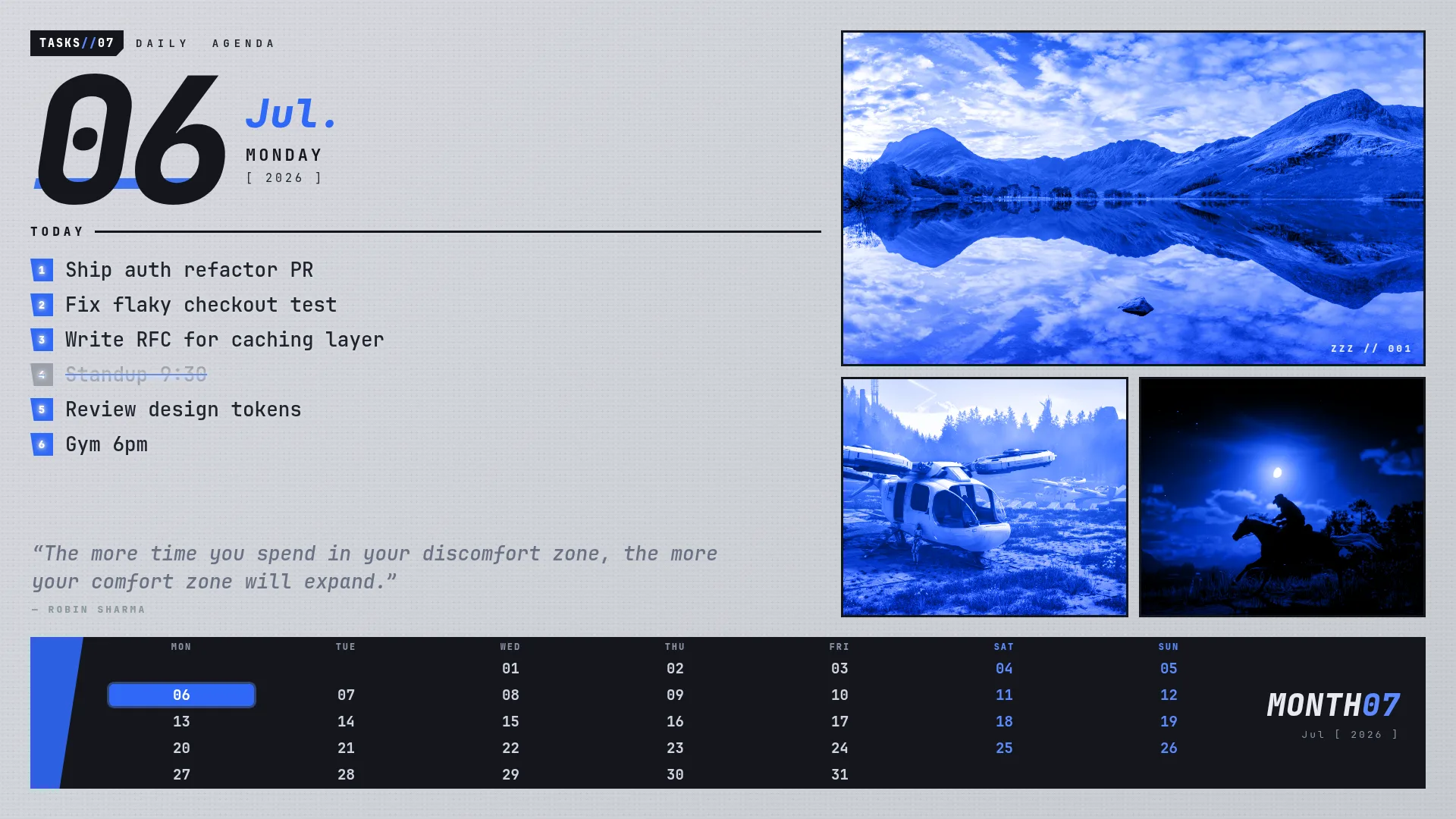
The aesthetic I wanted was the paneled, bold-numeral look of a game's in-app calendar: heavy display type, a hard grid, an accent colour doing a lot of work. The moment you want that, drawing text box-by-box with an image library becomes a nightmare of manual coordinates. But I already know a layout engine that does grid, flexbox, web fonts, and clip-paths for free: the browser.
So the poster is just a web page. A Bash script builds an HTML document (inline CSS, plus a tiny inline script that draws the month grid and highlights today), and then headless Chrome screenshots it into a 1920×1080 PNG.
google-chrome-stable --headless=new --hide-scrollbars \
  --window-size=1920,1080 --force-device-scale-factor=1 \
  --virtual-time-budget=4000 \
  --screenshot=poster.png "file://poster.html"
Two flags earned their place the hard way. --force-device-scale-factor=1 pins the output to exactly 1920×1080 regardless of the machine's display scaling. And --virtual-time-budget=4000 tells Chrome to let the page settle. Without it, a cold render fires the screenshot before the art images have loaded and you get a half-blank poster. Both bugs I hit before I trusted the pipeline.
Rendering a PNG is half the job; the other half is getting it onto the screen and keeping it there. The wallpaper daemon happily sets any image on a given output. The catch: my existing cycler was already rotating wallpapers on both monitors, so it would cheerfully overwrite my freshly-rendered agenda within minutes.
The fix was to teach the cycler to skip one output, a SKIP_MONITORS setting for the laptop panel, so the agenda owns that screen while the external monitor keeps its rotation. Then a single line in the Hyprland config renders at login and refreshes on a timer:
exec-once = bash -c 'while :; do task-wallpaper; sleep 600; done'I deliberately did not reach for a systemd user timer here, even though it's the "correct" tool for periodic jobs. A timer wouldn't inherit the Wayland session environment my setup exposes, so it couldn't talk to the compositor. A plain loop inside the Hyprland session already has everything it needs. Every 10 minutes it re-reads the task file, re-rolls the art, and refreshes the quote, which also means edits to my task list show up on their own without me lifting a finger.
The layout is a CSS grid: a content row on top, a fixed-height calendar bar pinned to the bottom. It rendered perfectly. Then one run picked a very tall art image, and suddenly the calendar bar was gone, shoved right off the bottom of the screen. Same code, different image, different result. Those are the annoying ones.
The culprit is a CSS quirk that bites everyone eventually: a grid (or flex) item defaults to min-height: auto, which means it refuses to shrink below the intrinsic size of its content. A large image blew the top row past its allotted track height and pushed the bottom row out of the viewport. The fix is one property:
.content-row { min-height: 0; } /* let the track win, not the image */With min-height: 0, the row respects its grid track and the image is clipped to fit instead of expanding the layout. It's a two-word fix that only makes sense once you know the rule, which is exactly why it cost an evening the first time.
I wanted a rotating quote too: a mix of developer wisdom and stoic philosophy. This turned into the most interesting engineering in the whole thing, because "fetch a quote from an API" is never as clean as it sounds.
Each run flips a coin. Developer quotes come from a local file I curated. Stoic quotes are fetched live from a public API, and that's where reality intruded. The API returns a lot of junk: truncated tweets, fragments starting mid-sentence, quotes "attributed" to @handles instead of actual people. Piping that straight onto my wallpaper looked terrible.
So every fetched quote goes through a quality gate before it's allowed anywhere near the screen. It has to have an author separator, be a sane length, start with a capital letter, and contain no @ handle:
QTEXT="${QLINE%%|*}"
if [[ -n "$QLINE" && "$QLINE" != *"null"* && "$QLINE" == *"|"* \
      && "$QLINE" != *"@"* && ${#QLINE} -le 160 \
      && ${#QTEXT} -ge 25 && "$QTEXT" =~ ^[A-Z] ]]; then
  # clean enough -> use it, and append to the local cache
fi
Anything that passes gets appended to a local cache, so the pool of good quotes grows every day the machine is online. And if the fetch fails, returns garbage, or I'm offline entirely, it falls back to the accumulated cache first, then to a bundled file. The wallpaper never shows a broken quote and never depends on the network being up.
Readable in the background
The last snag was visual. I wanted the quote to sit quietly behind the task list, but on a busy day the tasks overlap it and turned into mush. My first attempt, just fading the quote down, made it unreadable. The fix that worked was the opposite: keep the quote a legible mid-grey, and give the task text a paper-coloured halo (a layered text-shadow) so wherever a task sits on top of the quote, it punches a clean hole through it. Tasks always win; the quote fills the gaps.
This is a small personal tool, and I want to be honest about that. It's welded to Arch and Hyprland; it talks to a specific Wayland wallpaper daemon; it will not run on your Mac. I'm not pretending it's a product.
But the ideas inside it travel well, and that's why I wrote it up. Rendering a design to an image by driving a real browser instead of fighting an image library is a genuinely useful trick: it's the same idea behind social-card generators and PDF exporters. And treating a flaky external feed as untrusted input (gate it, cache the good stuff, always have a local fallback) is a pattern I reach for constantly in production frontend work, just dressed down here in twenty lines of Bash.
The best tools are the ones you build for an audience of one. The bar is honest, the feedback is instant, and you actually use the thing every single day.
The full source (script, quote pools, and setup notes) is on GitHub: github.com/mrwick1/daily-agenda-wallpaper.